
If you run a used car lot or an independent dealership, you already know the spreadsheet problem. Leads come in from Facebook, your website form, a walk-in, and a text message — and by Friday, half of them have gone cold because nobody followed up. Industry research on CRM adoption consistently points to the same pattern: dealerships that track every lead in one system close meaningfully more deals than dealerships running on memory, sticky notes, and a shared inbox.
The catch for a lot of independent dealers is price. Automotive-specific CRMs like VinSolutions, DealerSocket, or Elead are built for franchise stores with deep pockets, and the per-seat pricing reflects that. If you’re a 5-to-30-person dealership, you don’t need (or want) to pay enterprise software prices just to keep track of who asked about the Silverado on the lot.
That’s where open source CRM software comes in. Tools like SuiteCRM, EspoCRM, Odoo, and Vtiger give you a fully functional CRM — lead tracking, pipelines, follow-up automation, reporting — without a license fee. You self-host it, you own the data, and you customize it to match how your sales floor actually works.
This guide walks through how to set up open source CRM for auto dealers, step by step: which platform fits your dealership size, what it actually costs once you account for hosting and setup, and how to configure it specifically for vehicle sales instead of generic B2B sales.
This guide is written for independent and small franchise dealers, used car lot owners, and BHPH (buy-here-pay-here) operators who want more control over their lead data than a generic SaaS CRM offers, and who have at least some in-house or contracted technical help to manage a self-hosted system.
Table of Contents
- Why Auto Dealers Are Looking at Open Source CRM
- SuiteCRM vs EspoCRM vs Odoo vs Vtiger: Which Fits Your Dealership
- What You Actually Need Before Installing Anything
- Step-by-Step: Installing Your Open Source CRM
- Configuring the CRM for Vehicle Sales Workflows
- Connecting Your CRM to Lead Sources and Your Website
- Training Your Sales Team and Measuring Results
- FAQs
1. Why Auto Dealers Are Looking at Open Source CRM for Dealership Management
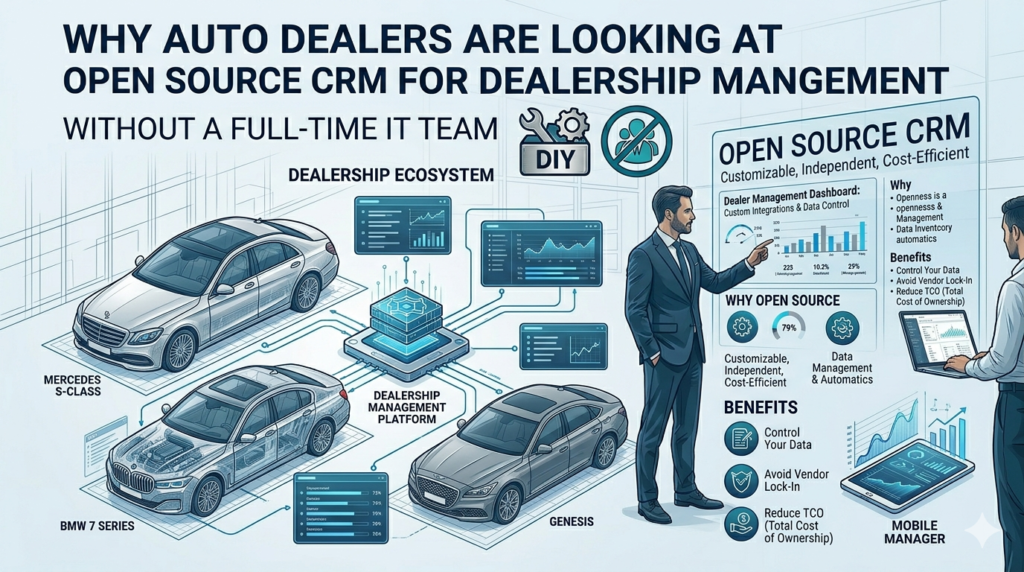
Most dealership management conversations jump straight to a DMS (dealer management system) — the back-office software that handles inventory, accounting, and titling. A CRM is a different layer. It’s the system that tracks the relationship: who inquired, what they asked about, when you last called them, and whether they showed up for their test drive.
The problem is that automotive-specific CRMs bundle CRM functionality with a lot of extras you may not need yet — equity mining tools, OEM lead feeds, deep DMS integrations — and price accordingly, often landing in the hundreds of dollars per user per month for mid-sized platforms. For a five-person used car lot, that math rarely works.
A self-hosted CRM for auto dealers flips the cost structure. The software itself is free under licenses like AGPL, GPL, or MIT. You’re paying for server hosting (often $20–$100/month for a small team), the time to configure it, and occasionally a developer to build automotive-specific fields. Realistic total cost of ownership for a 10-person dealership typically lands somewhere between a few thousand and the low five figures per year — still well under what a single seat of an enterprise automotive CRM can cost annually.
Internal linking opportunity: if you’ve already written a piece comparing dealership financing software, this is a natural place to link to it — readers evaluating a new CRM are often mid-overhaul of their entire tech stack.
The other reason dealers look at open source: data ownership. When your lead and customer data lives on a server you control, you’re not negotiating an export with a SaaS vendor if you ever want to switch systems, and you’re not subject to a vendor suddenly changing pricing tiers on you.
Quick tip: Before you fall in love with any platform’s feature list, write down your actual workflow on paper first — lead source → first contact → test drive → desk → finance → delivery → service follow-up. You’ll configure the CRM around that flow, not the other way around.
2. SuiteCRM vs EspoCRM vs Odoo vs Vtiger: Which CRM Fits Your Dealership
There isn’t one “best” open source CRM for every dealership — the right pick depends heavily on your team size and how much custom configuration you’re willing to do.
| Platform | Best for | License cost | Setup difficulty | Notable trade-off |
|---|---|---|---|---|
| SuiteCRM | Dealerships with 15+ users who want full customization | Free (AGPL) | High — PHP/MySQL, needs an admin | Dated interface; deep configuration takes real time |
| EspoCRM | Small lots (under 10–15 staff) wanting a quick, clean setup | Free (AGPL) | Low–Medium | Some reporting/workflow features sit behind a paid Advanced Pack |
| Odoo Community | Dealers who also want inventory, accounting, and invoicing in one system | Free (Community edition) | Medium–High | Many of the more advanced automation features live in the paid Enterprise edition |
| Vtiger Open Source | Teams wanting a balanced, all-in-one CRM with light support tooling | Free (limited edition) | Medium | The open-source edition is noticeably stripped down compared to Vtiger’s cloud product |
SuiteCRM is the workhorse option. It started as a fork of SugarCRM’s open-source codebase and has stayed fully open source ever since, with no per-user fee and no feature paywall on the core product. It gives you the deepest customization — custom modules, workflow automation, role-based permissions — which matters once you want fields like “trade-in VIN,” “desired payment range,” or “F&I status” that no generic CRM ships with out of the box. The trade-off is that it genuinely looks and feels like software from the early 2010s, and getting it configured well usually means budgeting real hours (or a freelance developer) for setup.
EspoCRM is the better starting point if you’re a small independent lot without in-house technical staff. It installs faster, has a noticeably cleaner interface, and its documentation is friendlier to a non-developer admin. The catch: some of the reporting and workflow automation that auto dealers want for follow-up sequences sits behind a paid add-on pack, so “fully free” EspoCRM is a bit more limited than SuiteCRM’s fully free core.
Odoo Community makes sense if you’re thinking bigger than just lead tracking. Because Odoo is modular — CRM, inventory, accounting, and invoicing all share one database — you can track a vehicle from the moment it hits your lot, through the sales pipeline, to the invoice, without re-entering data in three separate systems. The downside is that Odoo’s more dealership-friendly automation (advanced reporting, some integrations) lives in the paid Enterprise tier, and a misconfigured Community deployment can create reporting gaps that take a while to untangle without an experienced Odoo developer.
Vtiger’s open-source edition rounds out the list, but go in with clear eyes: Vtiger’s company strategy has shifted hard toward its paid cloud product over the years, and the free, self-hosted edition is missing a lot of what you’ll see in their demos. It’s worth a look if you specifically want a lightweight CRM with built-in helpdesk/ticketing for service-department follow-up, but don’t expect cloud-Vtiger feature parity.
Actionable tip: Spin up the free hosted demo of each platform (all four offer one) and have your actual sales manager — not just whoever’s doing the tech evaluation — click through creating a lead and moving it through a pipeline stage. Five minutes of hands-on testing tells you more than any comparison table.
A note on licenses, since dealers ask
“Open source” isn’t one license, and the differences actually matter for a dealership. SuiteCRM and Vtiger’s open-source edition both run under the AGPL, which is permissive enough for self-hosting but has copyleft terms that matter if you ever plan to modify and redistribute the code commercially (most dealers never will, so this is mostly academic for you). Odoo splits its codebase into an open-source Community edition (LGPL) and a proprietary Enterprise edition — a distinction that catches a lot of new adopters off guard when they realize a feature they saw in a demo video is actually an Enterprise-only module. Frappe CRM, a newer entrant built by the team behind ERPNext, uses the more permissive MIT license, which is worth knowing if your developer ever wants to fork and heavily customize the codebase without copyleft obligations.
None of this changes the day-to-day experience of running the CRM, but it’s worth understanding before you commit engineering time to deep customization, since the license determines what you’re allowed to do with your modifications later.
3. What You Actually Need Before Installing Anything
Before you touch an installer, get these four things sorted. Skipping this step is the single biggest reason self-hosted CRM projects stall out.
1. Hosting. SuiteCRM, EspoCRM, and Vtiger run on a standard LAMP-style stack (Linux, Apache or Nginx, MySQL/MariaDB, PHP). Odoo runs on Python with PostgreSQL. A small VPS from a mainstream cloud provider is usually enough for a dealership under 20 users — you don’t need anything exotic.
2. A domain and SSL certificate. Your CRM will hold customer phone numbers, financial details from credit applications, and ID information — that needs to sit behind HTTPS, not an unencrypted IP address. A free certificate from Let’s Encrypt covers this.
3. Someone responsible for maintenance. This is the part vendors don’t put on the pricing page. Self-hosted software needs security patches, backups, and the occasional troubleshooting session. Budget a few hours a month, either from an internal hire or a part-time contractor. If nobody on your team can own this, a managed hosting option for your chosen CRM (most of the major ones offer one) may be worth the extra monthly fee.
4. A clean list of your current leads and customers. Export whatever you’re using now — even if it’s a messy spreadsheet — into a CSV with consistent columns for name, phone, email, and lead source. You’ll import this once the CRM is live, and cleaning it up now saves a painful import later.
Internal linking opportunity: if your site has a separate post on choosing dealership website lead-capture forms, link it here — clean lead data starts at the point of capture, not the CRM import.
Sizing your server realistically
A common early mistake is either wildly over- or under-provisioning the server. For a dealership running SuiteCRM, EspoCRM, or Vtiger with under 20 concurrent users, a VPS with 2 vCPUs and 4GB of RAM is generally enough to keep the interface responsive — these are PHP applications, and the load profile is closer to a small business website than a data-heavy application. Odoo tends to want a bit more headroom, since its Python/PostgreSQL stack and module system are heavier; 4 vCPUs and 8GB RAM is a safer starting point if you’re running CRM plus inventory and accounting modules together.
Don’t try to economize by running your CRM on the same shared hosting plan as your dealership’s marketing website. Database-driven CRM software wants dedicated resources, and a slow CRM is one of the fastest ways to kill staff adoption before it even starts.
Compliance considerations specific to dealerships
Auto dealers collect more sensitive data than the average small business — credit applications, Social Security numbers for financing, sometimes driver’s license scans. Before you load real customer data into a self-hosted CRM, confirm you have:
- Encrypted backups, not just backups — a backup sitting in plain text is its own liability.
- Role-based access so only finance staff can see credit and income fields, not the entire sales floor.
- A retention policy, since regulations in many states require you to securely dispose of certain financial records after a defined period rather than keeping them indefinitely “just in case.”
This isn’t legal advice — check with your dealership’s compliance counsel on what applies in your state — but it’s worth raising with whoever configures your CRM’s permission structure before go-live, not after an audit.
4. Step-by-Step: Installing Your Open Source CRM
The exact steps vary by platform, but the shape of the process is the same across SuiteCRM, EspoCRM, and Vtiger. (Odoo’s installer is somewhat different since it runs on Python rather than PHP — its official documentation walks through the Docker-based install in detail.)
Step 1: Provision your server. Spin up a VPS, point your domain’s DNS at it, and install your web server stack (Apache/Nginx + PHP + MySQL, or Python + PostgreSQL for Odoo). Most providers offer one-click LAMP stack images that handle this for you.
Step 2: Download the CRM. Pull the latest stable release from the project’s official site or GitHub repository. For SuiteCRM specifically, note that the legacy v7 branch is still the feature-complete option as of this writing — the newer v8 rebuild is still filling in gaps like its reporting module, so unless you have a specific reason to run v8, the v7 long-term release is the safer choice for a dealership that needs reporting on day one.
Step 3: Run the installer wizard. Each platform ships with a setup wizard that creates the database, sets your admin credentials, and configures your site URL. This is usually a 10–15 minute process if your server prerequisites are already in place.
Step 4: Lock down security basics. Change default admin URLs where possible, enforce strong passwords, set up two-factor authentication if the platform supports it, and schedule automated database backups before you load any real customer data in.
Step 5: Import your existing leads. Use the platform’s CSV import tool to bring in your cleaned-up lead and customer list from Step 4 of the previous section. Map your spreadsheet columns to the CRM’s contact fields carefully — this is where most data ends up duplicated or mismatched if rushed.
“The CRM is only as good as the data you put into it on day one — a messy import creates years of cleanup work.” This is the most common regret reported by teams that have gone through self-hosted CRM rollouts, and it’s worth taking seriously before you flip the switch to live.
[Suggested image: screenshot of a generic CSV-to-CRM field-mapping screen, alt text: “mapping spreadsheet columns to CRM contact fields during open source CRM import”]
5. Configuring the CRM for Vehicle Sales Workflows
This is the step generic CRM tutorials skip, and it’s the one that actually makes the software useful for a dealership instead of a generic sales team.
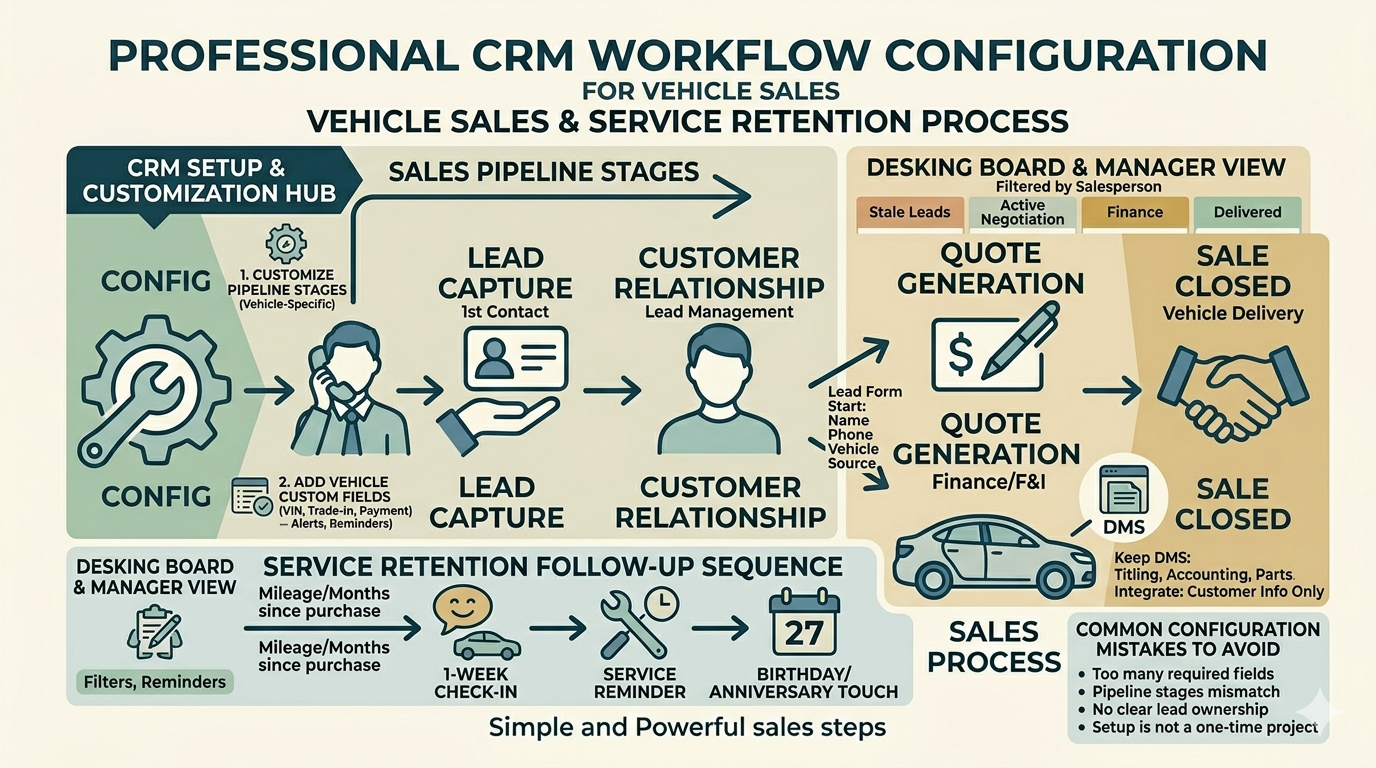
Customize your pipeline stages to match a vehicle sale, not a software sale. Out of the box, most CRMs ship with stages like “Qualification,” “Proposal,” “Negotiation.” Replace these with stages that reflect your actual sales process: New Lead → Contacted → Appointment Set → Test Drive Completed → Desk/Negotiation → Finance/F&I → Delivered → Service Follow-Up. SuiteCRM and Odoo both let you rename and reorder pipeline stages without touching code; EspoCRM’s entity manager handles this through its admin panel.
Add vehicle-specific custom fields. None of these platforms ship with fields for VIN, trade-in details, desired monthly payment, or credit tier — you’ll add them through each tool’s module/field builder. SuiteCRM’s Studio and Odoo’s Studio app (Enterprise-only for the visual builder, though custom fields are still possible in Community via developer work) are the two most flexible options here. EspoCRM’s Entity Manager is more limited but workable for basic custom fields.
Set up automated follow-up reminders. The biggest lift a CRM gives a small dealership isn’t reporting — it’s making sure nobody forgets to call a lead back. Configure workflow rules so that a lead sitting untouched for 24 hours triggers a task or notification for the assigned salesperson. SuiteCRM and Odoo both support this through their built-in workflow/automation engines; EspoCRM’s version of this lives in its (paid) Advanced Pack.
Build a simple desking view for your sales managers. If your CRM supports kanban-style boards (most do), set one up filtered by salesperson so managers can see, at a glance, who’s sitting on stale leads versus who’s actively working their pipeline.
Actionable tip: Don’t try to replicate your entire DMS inside the CRM. Keep titling, accounting, and parts inventory in your DMS, and use the CRM strictly for the customer relationship and sales pipeline — trying to merge the two systems is where most dealership CRM projects get bloated and abandoned.
Building a simple service-retention follow-up
Sales pipelines get most of the attention in CRM setup guides, but service retention is where a lot of dealership revenue actually lives. Once a vehicle is delivered, set up a basic automated sequence: a 1-week “how’s the vehicle” check-in, a service reminder timed to mileage or months-since-purchase, and a birthday or anniversary touch tied to the original sale date. SuiteCRM and Odoo both handle this through scheduled workflow rules tied to a date field on the contact or opportunity record; EspoCRM can do a simplified version with its built-in reminder and notification system even without the paid Advanced Pack, though the logic is less flexible.
Common configuration mistakes to avoid
A few patterns show up repeatedly in dealership CRM rollouts, regardless of which platform is chosen:
- Too many required fields on the lead form. If your sales reps have to fill in 15 fields to log a single walk-in, they’ll stop logging walk-ins. Start with name, phone, vehicle of interest, and source — add fields later once the habit is established.
- Pipeline stages that don’t match reality. If “Test Drive Completed” sits between two stages nobody actually uses in sequence, reps will skip stages or log everything at the same stage, and your reporting becomes meaningless.
- No clear lead ownership rules. Decide upfront whether leads are assigned round-robin, by source, or claimed manually — an unclear assignment process is one of the fastest ways for leads to fall through the cracks even with a CRM in place.
- Treating the CRM setup as a one-time project. The configuration that made sense at launch rarely survives six months of real use untouched. Build in a review cadence rather than discovering the gaps the hard way.
6. Connecting Your CRM to Lead Sources and Your Website
A CRM that only gets updated manually is a CRM that gets abandoned within a month. The real value comes from automatically routing leads into it the moment they arrive.
Website forms. If your website runs on WordPress, most open source CRMs have a plugin or webhook integration to pipe form submissions directly into a new lead record. For custom-built sites, all four platforms (SuiteCRM, EspoCRM, Odoo, Vtiger) expose a REST API that a developer can connect to your form’s submission handler in an afternoon.
Third-party listing sites. Leads from sites like Autotrader or Cars.com are typically delivered via ADF/XML, an industry-standard lead format. None of the mainstream open source CRMs parse ADF/XML natively, so this usually requires either a small custom integration script or a middleware tool that converts ADF/XML into a standard webhook your CRM can ingest.
Phone and text. If your team is taking a meaningful volume of calls and texts, look at pairing your CRM with a VoIP or business texting provider that supports webhooks or Zapier-style automation — most of these platforms can log calls back to the CRM lead record through their API, so you’re not manually re-typing call notes.
Internal linking opportunity: a comparison post on automotive answering services or texting platforms fits naturally here, since lead-routing setup is usually the next project after the CRM itself is live.
[Suggested image: a simple flow diagram showing lead sources — website form, Autotrader, walk-in, phone — funneling into a central CRM lead pipeline; alt text: “open source CRM lead routing diagram for auto dealers”]
7. Training Your Sales Team and Measuring Results
The software is the easy part. Getting a sales floor to actually log activity in a new system is where most CRM rollouts — open source or otherwise — succeed or fail.
Start with one mandatory habit, not ten. Don’t try to get your team logging every field on day one. Pick the single most important behavior — “every new lead gets logged within 5 minutes” — and make that non-negotiable before adding more process on top.
Make the manager dashboard the daily standup. If your sales manager opens the CRM pipeline view every morning and runs the team meeting from it, adoption follows almost automatically. If the manager is still working from memory or a whiteboard, the team will too.
Track a small number of metrics, consistently. Lead response time, appointment show rate, and lead-to-sale conversion rate by source are the three numbers that tell you whether the CRM is actually changing outcomes, versus just being a more expensive way to store the same spreadsheet.
Revisit your configuration after 60–90 days. Whatever pipeline stages and custom fields you set up on day one will be wrong in some small way once your team starts actually using the system. Schedule a deliberate review rather than letting workarounds quietly pile up.
Quick tip: Tie at least one small, visible win to the CRM early — a salesperson who closes a deal specifically because a follow-up reminder fired is the best adoption story you can tell the rest of the floor.
Conclusion
Setting up an open source CRM for your dealership isn’t a weekend project, but it’s a realistic one for a small or independent dealer who wants more control over lead data without enterprise-software pricing. Here’s the short version:
- SuiteCRM suits dealerships with 15+ staff that want deep, no-paywall customization and have some technical support available.
- EspoCRM is the faster, friendlier starting point for small lots without in-house developers.
- Odoo Community makes sense if you want CRM, inventory, and invoicing sharing one database.
- Vtiger’s open-source edition is worth a look for lightweight CRM-plus-helpdesk needs, but go in knowing it’s noticeably lighter than Vtiger’s paid cloud product.
- Self-hosting is genuinely free in licensing terms, but budget real hours (or dollars) for hosting, setup, and ongoing maintenance.
If you’ve been running your dealership on a shared spreadsheet and a stack of sticky notes, even a modestly configured open source CRM for auto dealers will be a step up — the bigger lift is building the habit of logging every lead the moment it comes in. Start small, get one workflow right, and expand from there.
If you’ve gone through a CRM setup at your own dealership — open source or otherwise — drop a comment with what worked and what you’d do differently. Real-world setup stories are more useful to other dealers than another feature comparison.
FAQs
Q1: Is open source CRM really free for an auto dealership? The software license is free — there’s no per-seat fee to download and run SuiteCRM, EspoCRM, Vtiger’s open-source edition, or Odoo Community. Your real costs come from server hosting, initial setup time, and ongoing maintenance, which for a small dealership typically lands in the low thousands of dollars per year rather than zero.
Q2: Which open source CRM is easiest to set up for a small used car lot? EspoCRM is generally the fastest to install and the friendliest for a non-technical admin. SuiteCRM and Odoo offer deeper customization but take longer to configure properly.
Q3: Can I connect my open source CRM to Autotrader or Cars.com leads? Yes, but it usually requires a small custom integration, since these sites deliver leads in the ADF/XML format and none of the mainstream open source CRMs parse that natively out of the box. A developer can typically build this connection in a short project.
Q4: Do I need a developer to run a self-hosted CRM? For basic day-to-day use — adding contacts, moving pipeline stages, running reports — no. For deeper customization like vehicle-specific fields, automated workflows, or third-party lead integrations, having access to a developer (even part-time or contracted) makes the setup go considerably smoother.
Q5: Should I use open source CRM instead of an automotive-specific CRM like VinSolutions or DealerSocket? It depends on your size and budget. Automotive-specific CRMs come with built-in DMS integrations, OEM lead feeds, and equity mining tools that an open source CRM won’t have natively. For large franchise stores with that need, the specialized tools are usually worth the cost. For independent or smaller dealerships mainly looking to track leads, automate follow-up, and avoid per-seat pricing, an open source CRM for auto dealers is a realistic, lower-cost alternative.
Q6: How long does it take to fully set up an open source CRM for a dealership? A bare-bones install can be running within a day. Getting it properly configured for vehicle sales — custom fields, pipeline stages, lead routing, and staff training — more realistically takes two to six weeks, depending on how much customization and integration work you need.
Q7: Is self-hosted CRM data more secure than a cloud CRM? It can be, but only if you actively maintain it. Self-hosting gives you full control over backups, access, and encryption, which matters for dealerships handling credit applications and personal financial data. That control is only a security advantage if someone is actually applying updates and monitoring the server — an unmaintained self-hosted CRM can end up less secure than a well-run SaaS product.
Q8: What happens if we outgrow our open source CRM later? Most dealerships that outgrow a self-hosted CRM are outgrowing the configuration, not the platform — adding a developer to rebuild workflows often solves it. If you do decide to migrate to a different system entirely, the CSV and API export options in SuiteCRM, EspoCRM, Odoo, and Vtiger all support a clean data export, so you’re not locked in. Map out which custom fields and historical notes matter most before any migration, since that’s where data tends to get lost if the move is rushed.